Custom MCP Tools
Important
10.2.0 change: Studio no longer includes the custom MCP-tool configuration page. The original content below is preserved to document behavior before 10.2.0 and does not apply to the current version. For current MCP integration, use perigon agent init and perigon agent mcp.
Perigon includes several built-in MCP tools, primarily for generating ASP.NET Core code structures.
In real-world development, you may need additional tools. Custom MCP tools allow you to extend functionality and meet specific requirements.
Adding Custom Tools
Before adding custom tools, first create templates and prompts. Then add custom tools in the MCP page.
Each tool can use only one prompt but can select multiple templates.
- Prompt: Guides the tool in generating code.
- Template: Provides code structure or reference.
Custom tools generate final code based on prompts and templates.
When adding a custom MCP tool, you will see:
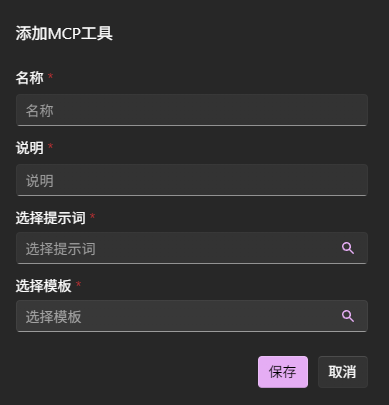
- Name: Must conform to MCP specifications (lowercase with underscores), such as
create_service. - Description: Critical for describing the tool's functionality. Be precise to ensure correct invocation.
Using Custom Tools
After adding custom tools, retrieve the tool list again in the client to see the newly added tools. Open the mcp.json file and click Restart.
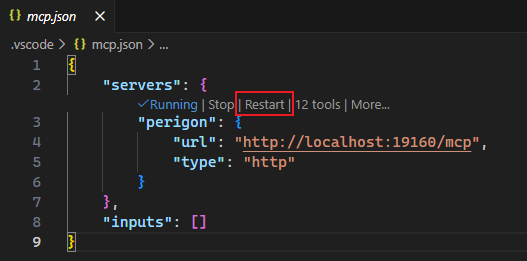
View the tool list. Custom tools will now appear in the list and be available for use in your IDE.
In this article